

The product, in depth
The decisions after the drainage survey.
A drainage survey leaves a team with reports, observations and evidence. The next job is to work out what those findings mean for the repair work. Insight Pipeline gives that stage its own workspace: bring the reports together, apply the team's repair rules, investigate the evidence and export a reviewed worklist.
The product connects processing with review. A proposed repair remains something to check against the job, the source material and the team's own approach. The built-in advisor offers another perspective on repair options and cost considerations, while the person reviewing the work keeps the final decision.
01 / The working view
Turn separate observations into a reviewable worklist.
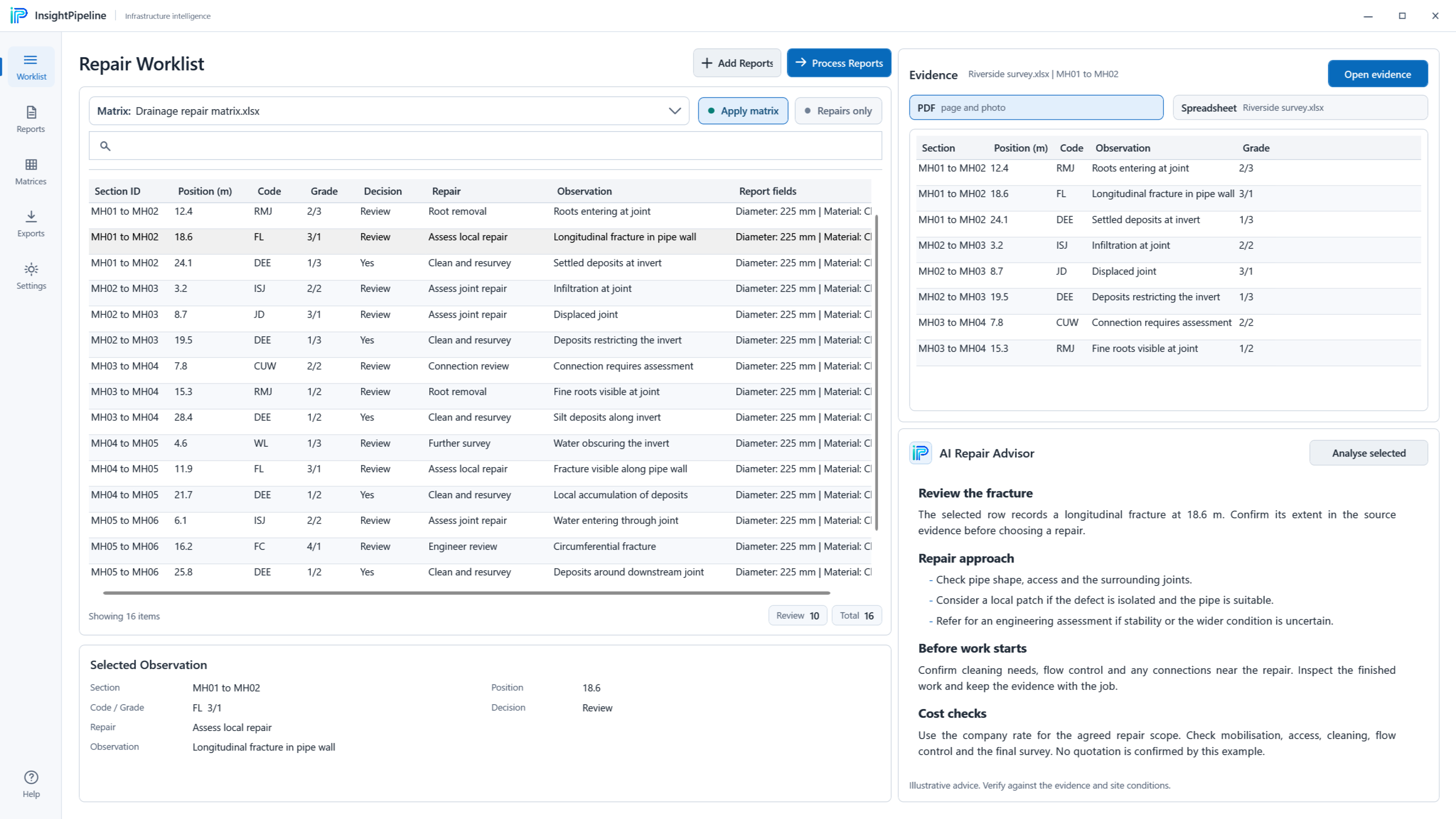
The worklist brings drainage observations into a common view. Instead of treating each report as a separate destination, the reviewer can work through the findings as a connected set of decisions. Matrix results, observation detail and supporting material belong to the same review process. The aim is to make it clear what has been proposed and what needs a closer look.
Filtering helps the reviewer focus on the relevant rows without losing the relationship to the source information. An observation is not useful simply because it has been extracted into a table: the team still needs to understand its condition, the repair decision associated with it and any reason for review. The worklist keeps those questions within the application rather than assuming that a processed result is ready to act on.
02 / Report preparation
Keep the files for the current job together.
The report library is the starting point for a job. It brings PDF, Word and spreadsheet reports into one place, with file selection making the material for the current review explicit. The supplied interface shows examples across PDF, Word, Excel and CSV, rather than asking the reviewer to move between unrelated folders while processing the same job.
Selecting the source material is an important part of the workflow. The reports chosen for processing define the context of the resulting worklist; reviewing the output should not be separated from understanding which files went into it. Support for these formats is not a promise that every report layout will extract perfectly. The product's evidence and review stages remain important when checking the findings and deciding what belongs in the final output.
03 / The repair matrix
Apply the rules your team actually works with.
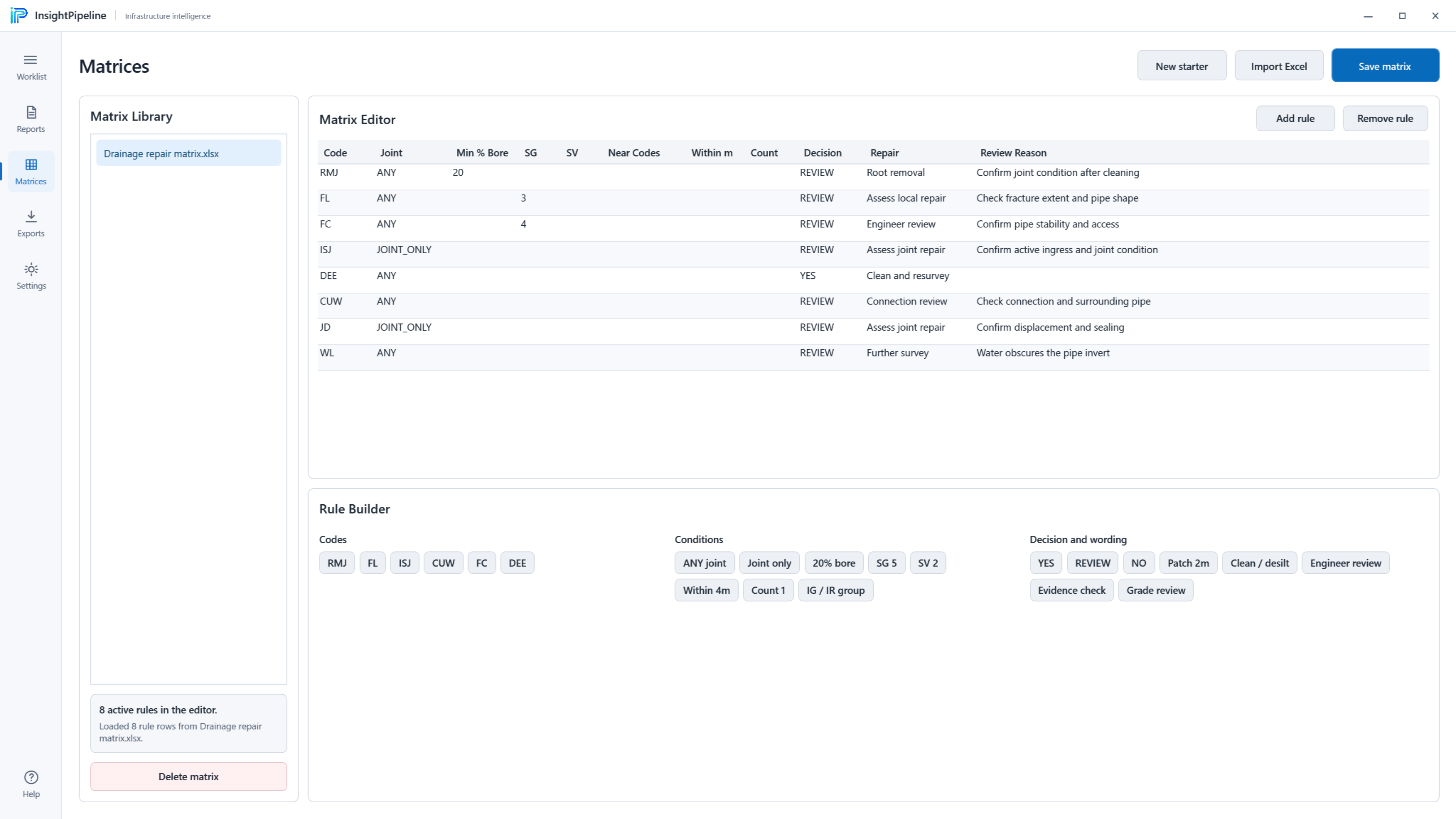
Repair decisions depend on a team's approach to the work. Insight Pipeline includes an editable repair matrix rather than presenting one fixed set of rules as the answer for every job. The matrix editor supports rules around defect codes, grades and nearby observations, giving the team a way to express how those conditions should inform a proposed repair.
That structure makes the relationship between an observation and a decision more visible. Rules can be examined and revised, while reasons for review help identify findings that need attention. A matrix is a working tool within the review process, not a substitute for engineering judgement. The rules shown in the portfolio images are illustrative examples, not a recommended specification or a statement that the same repair is appropriate wherever a similar code appears.
04 / Evidence & context
Keep the original material beside the decision.
A proposed repair is more useful when the reviewer can see the information behind it. The evidence view keeps the source context beside the selected observation, allowing the person checking the work to return to the report material rather than rely on a condensed row alone. The supplied detail image shows spreadsheet evidence as part of that relationship.
This is a deliberate connection between information handling and practical review. Moving findings into a common table should not remove the detail needed to understand them. Keeping the source close helps a reviewer investigate a result, question an interpretation and decide whether further checking is necessary. It does not establish that extraction is error free, or that a report alone contains everything needed for a final site decision.
05 / Advisory assistance
A second view on the repair, not the final word.
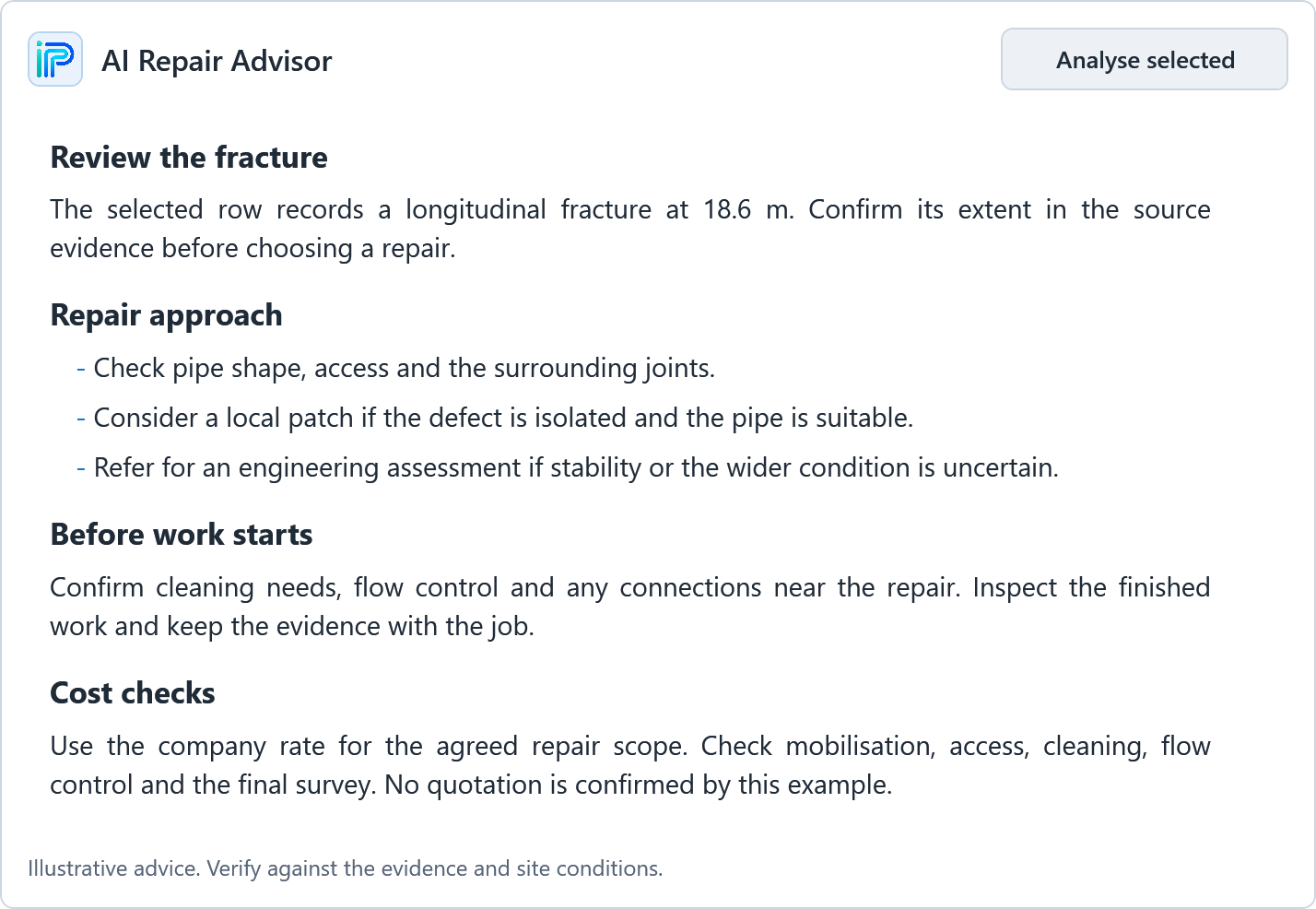
The built-in repair advisor can help the reviewer consider possible repair approaches, site checks and cost drivers for the selected defect. Its place in the application matters: the guidance is connected to a specific observation and reviewed alongside the evidence, rather than presented as an isolated answer with no relationship to the job.
The reviewer remains responsible for deciding how to use that guidance. Site conditions, the available source material and the team's own judgement still matter. The portfolio image contains a prepared example of advisor text; it is not a live model response, a contractor quotation or a claim of accuracy. Cost considerations are also not live market prices. Where a company pricing source is configured, it provides context for guidance rather than removing the need to check the actual work and commercial assumptions.
06 / Review & handover
Choose what leaves the workspace.
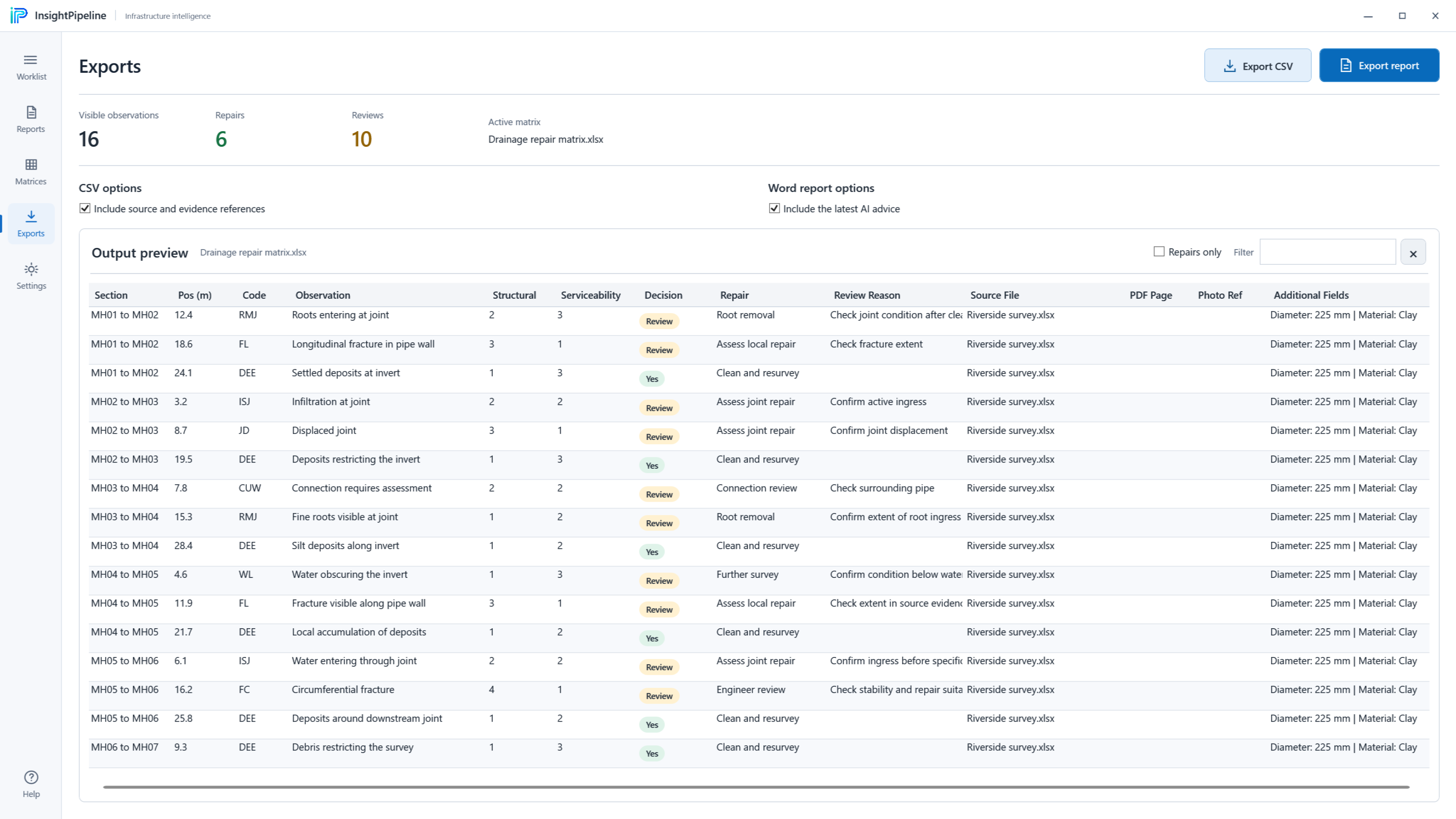
The export stage makes the final selection visible before the worklist leaves the application. The reviewer can inspect the rows included in the output and generate a CSV or Word report, retaining source references and including the latest repair advice where appropriate. Processing, checking and exporting are connected stages, rather than a single action that assumes every generated result should be sent onward.
That gives the output a clear purpose: a reviewed collection of observations and decisions that can be taken into the next part of the job. The export preview shows repair and review totals alongside the selected information, helping the user understand the proposed handover. The responsibility is still to check the content and its suitability for the job, not to treat a downloaded document as evidence that every underlying decision has been independently validated.
07 / Working preferences
Set up the context before asking for guidance.
The settings view brings appearance, review and export defaults, and advisor context into one place. Light and dark themes offer different presentations of the same workflow. Review preferences and export choices help establish how the workspace is used, while the advisor settings make the context shared with that feature a deliberate configuration decision.
Company pricing can also be provided when cost guidance is needed. The distinction between a configured source and a live rate service is important: the example settings do not demonstrate current contractor prices or an automatically verified market quotation. The value of configuration is in making the assumptions and defaults available to the team, so guidance can be understood in the context in which it was produced.
08 / A connected workflow
A clear route from the first file to the final check.
The built-in guide follows the same sequence as the application: add reports, work through the observations, examine the evidence and check the export. A page guide and a route to the Insight Pipeline website give the user somewhere to return when they need to understand the process or find support. Guidance belongs within the working environment, not only in a separate introduction that is forgotten after setup.
For Cosilan, the project is an example of domain-focused software: the report, the repair rule, the evidence and the handover are treated as parts of one job. The design work is in those connections as much as in the individual screens. The portfolio presents that workflow through the supplied application captures, with fictional reports and observations kept clearly separate from claims about customer performance or measured time savings.